Super Elevation
The Superelevation tool allows users to define and modify the lateral inclination of a road. It controls how the road surface is tilted along the road by defining Angle and Slope values at specific positions.
The tool also supports defining an Angle from Vertical Offset, allowing the road's tilt to be set using a vertical offset value.
Warning
A road must be selected before using the Superelevation tool. The tool remains inactive until a road is selected.
Select a Road and Activate the Superelevation Tool
- Left-click on the road you want to edit.
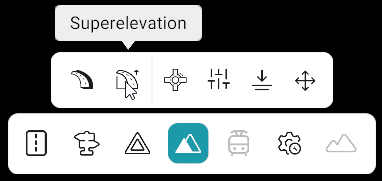
- Click the Superelevation tool.
- Right-click on the selected road.
- Yellow superelevation points appear at the start and end of the road.
Set Superelevation Values
- Left-click a superelevation point.
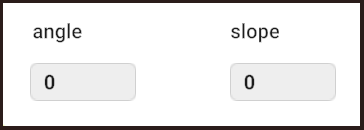
- The Superelevation panel opens.
- Enter the required Angle and Slope values.
- Press Enter to apply the values.
Add and Remove Superelevation Points
| Action | How to Perform |
|---|---|
| Add Node | Move the cursor to the desired position on the road and press A. |
| Remove Node | Select the point and press D. The first and last superelevation points cannot be removed. |
Superelevation Parameters
| Parameter | Purpose |
|---|---|
| Angle | Controls how much the road is tilted at the selected point. |
| Slope | Controls how the road's elevation changes between superelevation points. |
| Vertical Offset | Defines the vertical difference used to set the road's angle. |
Superelevation panel screenshot
Notes
- Angle: Allowed values are −75 to +75. Positive values tilt the road counterclockwise, while negative values tilt it clockwise.
- Slope: Allowed values are −15 to +15. The first and last points cannot have a Slope value.
Angle from Vertical Offset
- Select the required superelevation point.
- Press Ctrl + Left-click on the point.
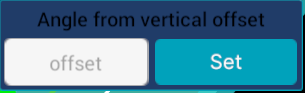
- The Vertical Offset panel opens.
- Enter the required offset value.
- Click Set.
Vertical Offset panel screenshot
Notes
- Press Esc once to unselect the current road.
- Left-click another road to select it and continue editing its superelevation without activating the tool again.
- Press Esc again to unselect the Superelevation tool.